Custom Response - HTML, Stream, File, others
By default, FastAPI will return JSON responses.
You can override it by returning a Response directly as seen in Return a Response directly.
But if you return a Response directly (or any subclass, like JSONResponse), the data won't be automatically converted (even if you declare a response_model), and the documentation won't be automatically generated (for example, including the specific "media type", in the HTTP header Content-Type as part of the generated OpenAPI).
But you can also declare the Response that you want to be used (e.g. any Response subclass), in the path operation decorator using the response_class parameter.
The contents that you return from your path operation function will be put inside of that Response.
JSON Responses
Section titled “JSON Responses”By default FastAPI returns JSON responses.
If you declare a Response Model FastAPI will use it to serialize the data to JSON, using Pydantic.
If you don't declare a response model, FastAPI will use the jsonable_encoder explained in JSON Compatible Encoder and put it in a JSONResponse.
If you declare a response_class with a JSON media type (application/json), like is the case with the JSONResponse, the data you return will be automatically converted (and filtered) with any Pydantic response_model that you declared in the path operation decorator. But the data won't be serialized to JSON bytes with Pydantic, instead it will be converted with the jsonable_encoder and then passed to the JSONResponse class, which will serialize it to bytes using the standard JSON library in Python.
JSON Performance
Section titled “JSON Performance”In short, if you want the maximum performance, use a Response Model and don't declare a response_class in the path operation decorator.
from fastapi import FastAPI
from pydantic import BaseModel

app = FastAPI()


class Item(BaseModel):
    name: str
    description: str | None = None
    price: float
    tax: float | None = None
    tags: list[str] = []


@app.post("/items/")
async def create_item(item: Item) -> Item:
    return item


@app.get("/items/")
async def read_items() -> list[Item]:
    return [
        Item(name="Portal Gun", price=42.0),
        Item(name="Plumbus", price=32.0),
    ]
HTML Response
Section titled “HTML Response”To return a response with HTML directly from FastAPI, use HTMLResponse.
- Import
HTMLResponse. - Pass
HTMLResponseas the parameterresponse_classof your path operation decorator.
from fastapi import FastAPI
from fastapi.responses import HTMLResponse

app = FastAPI()


@app.get("/items/", response_class=HTMLResponse)
async def read_items():
    return """
    <html>
        <head>
            <title>Some HTML in here</title>
        </head>
        <body>
            <h1>Look ma! HTML!</h1>
        </body>
    </html>
"""Return a Response
Section titled “Return a Response”As seen in Return a Response directly, you can also override the response directly in your path operation, by returning it.
The same example from above, returning an HTMLResponse, could look like:
from fastapi import FastAPI
from fastapi.responses import HTMLResponse

app = FastAPI()


@app.get("/items/")
async def read_items():
    html_content = """
    <html>
        <head>
            <title>Some HTML in here</title>
        </head>
        <body>
            <h1>Look ma! HTML!</h1>
        </body>
    </html>
    """
return HTMLResponse(content=html_content, status_code=200)Document in OpenAPI and override Response
Section titled “Document in OpenAPI and override Response”If you want to override the response from inside of the function but at the same time document the "media type" in OpenAPI, you can use the response_class parameter AND return a Response object.
The response_class will then be used only to document the OpenAPI path operation, but your Response will be used as is.
Return an HTMLResponse directly
Section titled “Return an HTMLResponse directly”For example, it could be something like:
from fastapi import FastAPI
from fastapi.responses import HTMLResponse

app = FastAPI()


def generate_html_response():
    html_content = """
    <html>
        <head>
            <title>Some HTML in here</title>
        </head>
        <body>
            <h1>Look ma! HTML!</h1>
        </body>
    </html>
    """
    return HTMLResponse(content=html_content, status_code=200)


@app.get("/items/", response_class=HTMLResponse)
async def read_items():
    return generate_html_response()
In this example, the function generate_html_response() already generates and returns a Response instead of returning the HTML in a str.
By returning the result of calling generate_html_response(), you are already returning a Response that will override the default FastAPI behavior.
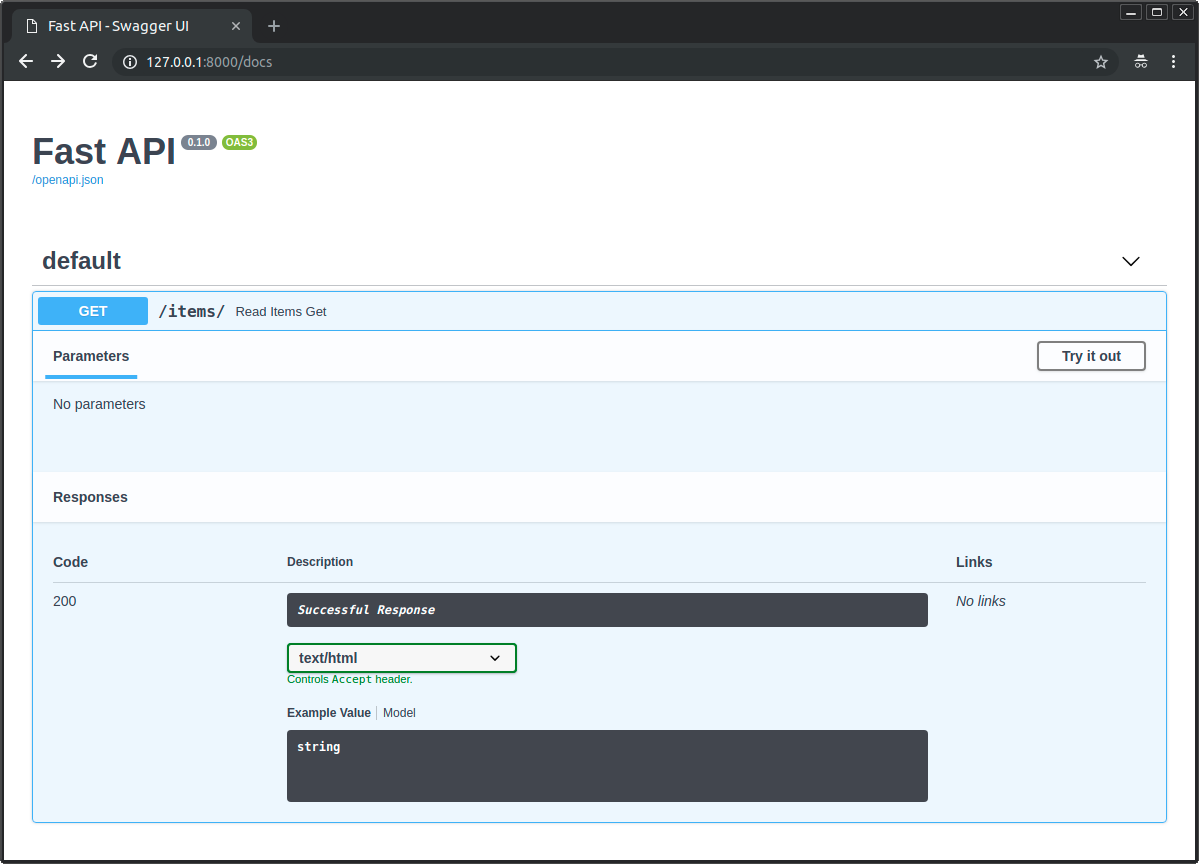
But as you passed the HTMLResponse in the response_class too, FastAPI will know how to document it in OpenAPI and the interactive docs as HTML with text/html:
Available responses
Section titled “Available responses”Here are some of the available responses.
Keep in mind that you can use Response to return anything else, or even create a custom sub-class.
Response
Section titled “Response”The main Response class, all the other responses inherit from it.
You can return it directly.
It accepts the following parameters:
content- Astrorbytes.status_code- AnintHTTP status code.headers- Adictof strings.media_type- Astrgiving the media type. E.g."text/html".
FastAPI (actually Starlette) will automatically include a Content-Length header. It will also include a Content-Type header, based on the media_type and appending a charset for text types.
from fastapi import FastAPI, Response

app = FastAPI()


@app.get("/legacy/")
def get_legacy_data():
    data = """<?xml version="1.0"?>
    <shampoo>
    <Header>
        Apply shampoo here.
    </Header>
    <Body>
        You'll have to use soap here.
    </Body>
    </shampoo>
    """
    return Response(content=data, media_type="application/xml")
HTMLResponse
Section titled “HTMLResponse”Takes some text or bytes and returns an HTML response, as you read above.
PlainTextResponse
Section titled “PlainTextResponse”Takes some text or bytes and returns a plain text response.
from fastapi import FastAPI
from fastapi.responses import PlainTextResponse

app = FastAPI()


@app.get("/", response_class=PlainTextResponse)
async def main():
    return "Hello World"
JSONResponse
Section titled “JSONResponse”Takes some data and returns an application/json encoded response.
This is the default response used in FastAPI, as you read above.
RedirectResponse
Section titled “RedirectResponse”Returns an HTTP redirect. Uses a 307 status code (Temporary Redirect) by default.
You can return a RedirectResponse directly:
from fastapi import FastAPI
from fastapi.responses import RedirectResponse

app = FastAPI()


@app.get("/typer")
async def redirect_typer():
    return RedirectResponse("https://typer.tiangolo.com")
Or you can use it in the response_class parameter:
from fastapi import FastAPI
from fastapi.responses import RedirectResponse

app = FastAPI()


@app.get("/fastapi", response_class=RedirectResponse)
async def redirect_fastapi():
    return "https://fastapi.tiangolo.com"
If you do that, then you can return the URL directly from your path operation function.
In this case, the status_code used will be the default one for the RedirectResponse, which is 307.
You can also use the status_code parameter combined with the response_class parameter:
from fastapi import FastAPI
from fastapi.responses import RedirectResponse

app = FastAPI()


@app.get("/pydantic", response_class=RedirectResponse, status_code=302)
async def redirect_pydantic():
    return "https://docs.pydantic.dev/"
StreamingResponse
Section titled “StreamingResponse”Takes an async generator or a normal generator/iterator (a function with yield) and streams the response body.
import anyio
from fastapi import FastAPI
from fastapi.responses import StreamingResponse

app = FastAPI()


async def fake_video_streamer():
    for i in range(10):
        yield b"some fake video bytes"
        await anyio.sleep(0)


@app.get("/")
async def main():
return StreamingResponse(fake_video_streamer())FileResponse
Section titled “FileResponse”Asynchronously streams a file as the response.
Takes a different set of arguments to instantiate than the other response types:
path- The file path to the file to stream.headers- Any custom headers to include, as a dictionary.media_type- A string giving the media type. If unset, the filename or path will be used to infer a media type.filename- If set, this will be included in the responseContent-Disposition.
File responses will include appropriate Content-Length, Last-Modified and ETag headers.
from fastapi import FastAPI
from fastapi.responses import FileResponse

some_file_path = "large-video-file.mp4"
app = FastAPI()


@app.get("/")
async def main():
    return FileResponse(some_file_path)
You can also use the response_class parameter:
from fastapi import FastAPI
from fastapi.responses import FileResponse

some_file_path = "large-video-file.mp4"
app = FastAPI()


@app.get("/", response_class=FileResponse)
async def main():
    return some_file_path
In this case, you can return the file path directly from your path operation function.
Custom response class
Section titled “Custom response class”You can create your own custom response class, inheriting from Response and using it.
For example, let's say that you want to use orjson with some settings.
Let's say you want it to return indented and formatted JSON, so you want to use the orjson option orjson.OPT_INDENT_2.
You could create a CustomORJSONResponse. The main thing you have to do is create a Response.render(content) method that returns the content as bytes:
from typing import Any

import orjson
from fastapi import FastAPI, Response

app = FastAPI()


class CustomORJSONResponse(Response):
    media_type = "application/json"

    def render(self, content: Any) -> bytes:
        assert orjson is not None, "orjson must be installed"
        return orjson.dumps(content, option=orjson.OPT_INDENT_2)


@app.get("/", response_class=CustomORJSONResponse)
async def main():
    return {"message": "Hello World"}
Now instead of returning:
{"message": "Hello World"}...this response will return:
{
  "message": "Hello World"
}
Of course, you will probably find much better ways to take advantage of this than formatting JSON. 😉
orjson or Response Model
Section titled “orjson or Response Model”If what you are looking for is performance, you are probably better off using a Response Model than an orjson response.
With a response model, FastAPI will use Pydantic to serialize the data to JSON, without using intermediate steps, like converting it with jsonable_encoder, which would happen in any other case.
And under the hood, Pydantic uses the same underlying Rust mechanisms as orjson to serialize to JSON, so you will already get the best performance with a response model.
Default response class
Section titled “Default response class”When creating a FastAPI class instance or an APIRouter you can specify which response class to use by default.
The parameter that defines this is default_response_class.
In the example below, FastAPI will use HTMLResponse by default, in all path operations, instead of JSON.
from fastapi import FastAPI
from fastapi.responses import HTMLResponse

app = FastAPI(default_response_class=HTMLResponse)


@app.get("/items/")
async def read_items():
return "<h1>Items</h1><p>This is a list of items.</p>"Additional documentation
Section titled “Additional documentation”You can also declare the media type and many other details in OpenAPI using responses: Additional Responses in OpenAPI.