Additional Responses in OpenAPI
You can declare additional responses, with additional status codes, media types, descriptions, etc.
Those additional responses will be included in the OpenAPI schema, so they will also appear in the API docs.
But for those additional responses you have to make sure you return a Response like JSONResponse directly, with your status code and content.
Additional Response with model
Section titled “Additional Response with model”You can pass to your path operation decorators a parameter responses.
It receives a dict: the keys are status codes for each response (like 200), and the values are other dicts with the information for each of them.
Each of those response dicts can have a key model, containing a Pydantic model, just like response_model.
FastAPI will take that model, generate its JSON Schema and include it in the correct place in OpenAPI.
For example, to declare another response with a status code 404 and a Pydantic model Message, you can write:
from fastapi import FastAPI
from fastapi.responses import JSONResponse
from pydantic import BaseModel


class Item(BaseModel):
    id: str
    value: str


class Message(BaseModel):
    message: str


app = FastAPI()


@app.get("/items/{item_id}", response_model=Item, responses={404: {"model": Message}})
async def read_item(item_id: str):
    if item_id == "foo":
        return {"id": "foo", "value": "there goes my hero"}
return JSONResponse(status_code=404, content={"message": "Item not found"})The generated responses in the OpenAPI for this path operation will be:
{ "responses": { "404": { "description": "Additional Response", "content": { "application/json": { "schema": { "$ref": "#/components/schemas/Message" } } } }, "200": { "description": "Successful Response", "content": { "application/json": { "schema": { "$ref": "#/components/schemas/Item" } } } }, "422": { "description": "Validation Error", "content": { "application/json": { "schema": { "$ref": "#/components/schemas/HTTPValidationError" } } } } }}The schemas are referenced to another place inside the OpenAPI schema:
{ "components": { "schemas": { "Message": { "title": "Message", "required": [ "message" ], "type": "object", "properties": { "message": { "title": "Message", "type": "string" } } }, "Item": { "title": "Item", "required": [ "id", "value" ], "type": "object", "properties": { "id": { "title": "Id", "type": "string" }, "value": { "title": "Value", "type": "string" } } }, "ValidationError": { "title": "ValidationError", "required": [ "loc", "msg", "type" ], "type": "object", "properties": { "loc": { "title": "Location", "type": "array", "items": { "type": "string" } }, "msg": { "title": "Message", "type": "string" }, "type": { "title": "Error Type", "type": "string" } } }, "HTTPValidationError": { "title": "HTTPValidationError", "type": "object", "properties": { "detail": { "title": "Detail", "type": "array", "items": { "$ref": "#/components/schemas/ValidationError" } } } } } }}Additional media types for the main response
Section titled “Additional media types for the main response”You can use this same responses parameter to add different media types for the same main response.
For example, you can add an additional media type of image/png, declaring that your path operation can return a JSON object (with media type application/json) or a PNG image:
from fastapi import FastAPI
from fastapi.responses import FileResponse
from pydantic import BaseModel


class Item(BaseModel):
    id: str
    value: str


app = FastAPI()


@app.get(
    "/items/{item_id}",
    response_model=Item,
    responses={
        200: {
            "content": {"image/png": {}},
            "description": "Return the JSON item or an image.",
        }
    },
)
async def read_item(item_id: str, img: bool | None = None):
    if img:
        return FileResponse("image.png", media_type="image/png")
    else:
return {"id": "foo", "value": "there goes my hero"}Combining information
Section titled “Combining information”You can also combine response information from multiple places, including the response_model, status_code, and responses parameters.
You can declare a response_model, using the default status code 200 (or a custom one if you need), and then declare additional information for that same response in responses, directly in the OpenAPI schema.
FastAPI will keep the additional information from responses, and combine it with the JSON Schema from your model.
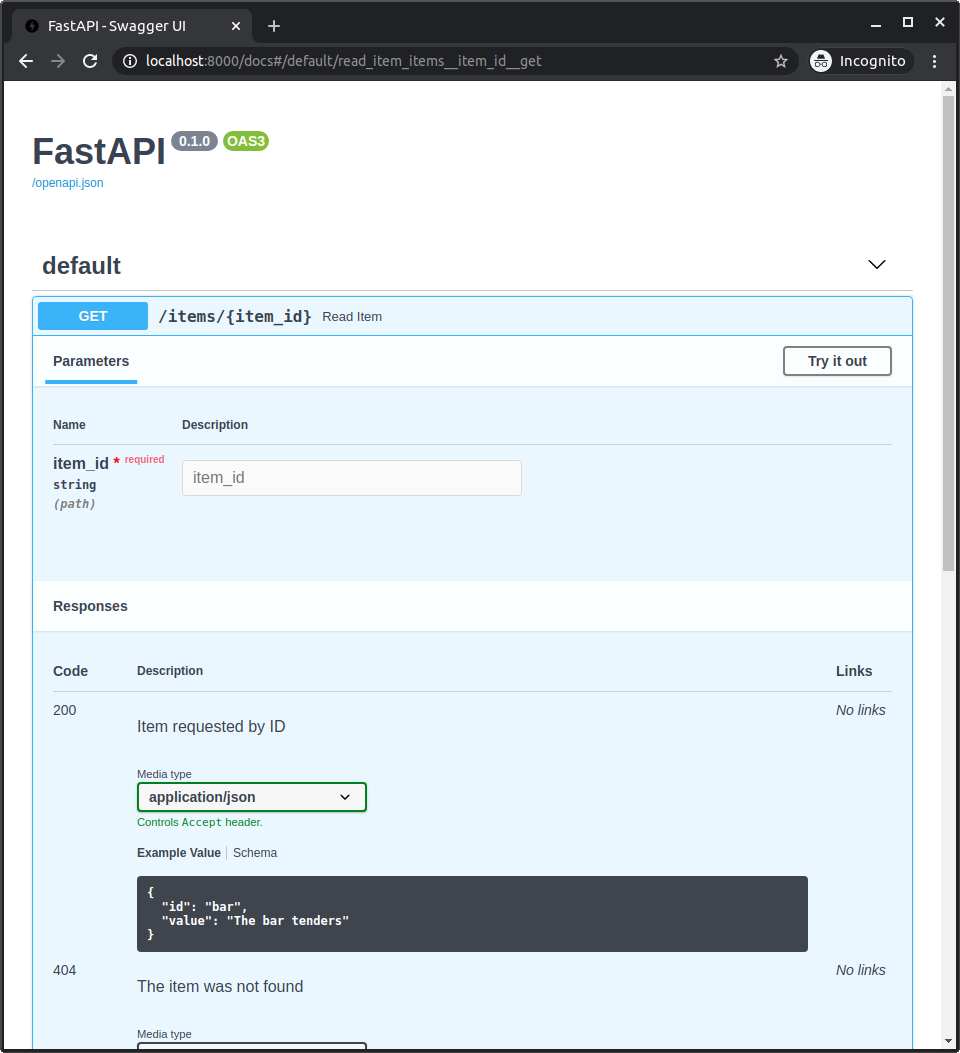
For example, you can declare a response with a status code 404 that uses a Pydantic model and has a custom description.
And a response with a status code 200 that uses your response_model, but includes a custom example:
from fastapi import FastAPI
from fastapi.responses import JSONResponse
from pydantic import BaseModel


class Item(BaseModel):
    id: str
    value: str


class Message(BaseModel):
    message: str


app = FastAPI()


@app.get(
    "/items/{item_id}",
    response_model=Item,
    responses={
        404: {"model": Message, "description": "The item was not found"},
        200: {
            "description": "Item requested by ID",
            "content": {
                "application/json": {
                    "example": {"id": "bar", "value": "The bar tenders"}
                }
            },
        },
    },
)
async def read_item(item_id: str):
    if item_id == "foo":
        return {"id": "foo", "value": "there goes my hero"}
    else:
        return JSONResponse(status_code=404, content={"message": "Item not found"})
It will all be combined and included in your OpenAPI, and shown in the API docs:
Combine predefined responses and custom ones
Section titled “Combine predefined responses and custom ones”You might want to have some predefined responses that apply to many path operations, but you want to combine them with custom responses needed by each path operation.
For those cases, you can use the Python technique of "unpacking" a dict with **dict_to_unpack:
old_dict = {
    "old key": "old value",
    "second old key": "second old value",
}
new_dict = {**old_dict, "new key": "new value"}
Here, new_dict will contain all the key-value pairs from old_dict plus the new key-value pair:
{
    "old key": "old value",
    "second old key": "second old value",
    "new key": "new value",
}
You can use that technique to reuse some predefined responses in your path operations and combine them with additional custom ones.
For example:
from fastapi import FastAPI
from fastapi.responses import FileResponse
from pydantic import BaseModel


class Item(BaseModel):
    id: str
    value: str


responses = {
    404: {"description": "Item not found"},
    302: {"description": "The item was moved"},
    403: {"description": "Not enough privileges"},
}


app = FastAPI()


@app.get(
    "/items/{item_id}",
    response_model=Item,
    responses={**responses, 200: {"content": {"image/png": {}}}},
)
async def read_item(item_id: str, img: bool | None = None):
    if img:
        return FileResponse("image.png", media_type="image/png")
    else:
        return {"id": "foo", "value": "there goes my hero"}
More information about OpenAPI responses
Section titled “More information about OpenAPI responses”To see what exactly you can include in the responses, you can check these sections in the OpenAPI specification:
- OpenAPI Responses Object, it includes the
Response Object. - OpenAPI Response Object, you can include anything from this directly in each response inside your
responsesparameter. Includingdescription,headers,content(inside of this is that you declare different media types and JSON Schemas), andlinks.